🛒Issues with In-Game or Web-Shop Purchases? Here is What to Do!🛒
Issues with In-Game or Web-Shop Purchases? Here is What to Do!
Most transactions process instantly, but occasionally, technical hiccups or network delays can happen. If you encounter any issues with a purchase made in-game or on our Pixel Web-Shop, don’t worry — our Support team is here to help you get what you paid for as quickly as possible!
What to Check First
Before contacting us, we recommend:
Wait 5–10 minutes: In rare cases, the payment platform may still be processing your transaction.
Restart the game: Completely close the app/game (swipe it away from recent apps) and restart it with a stable internet connection. Many missing items are automatically delivered upon a fresh login.
Still Missing Your Purchase? Contact Support!
If your purchase still hasn't arrived, please reach out to our Support team. To resolve your issue without unnecessary delays, we need two key things:
1. A Clear Description of the Problem
Please let us know:
What exact pack or offer did you purchase?
What happened? (e.g., “The transaction went through and money was deducted, but the gems never arrived”, “The screen is stuck on ‘Processing...’”, or “I was charged twice for a single pack”).
2. An Official Receipt (Screenshot or Forwarded Email)
We cannot look up your transaction using bank statements, credit card app notifications, or SMS alerts. We need the official receipt from the platform where you made the purchase, containing the unique Transaction / Order ID.
Examples of Official Receipts & Order IDs
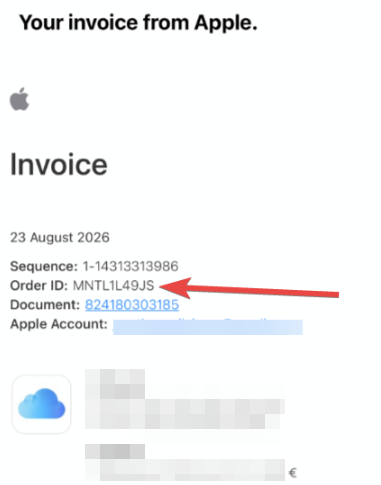
Apple (App Store)
Where to find it: Apple sends this to your Apple ID email address. You can also view it in your iOS device settings: Settings ➔ [Your Name] ➔ Media & Purchases ➔ View Account ➔ Purchase History.
What to look for:
Order ID format: Usually looks like M1234ABCDE or similar alphanumeric codes.
Document / Invoice No.
Example Apple Receipt:
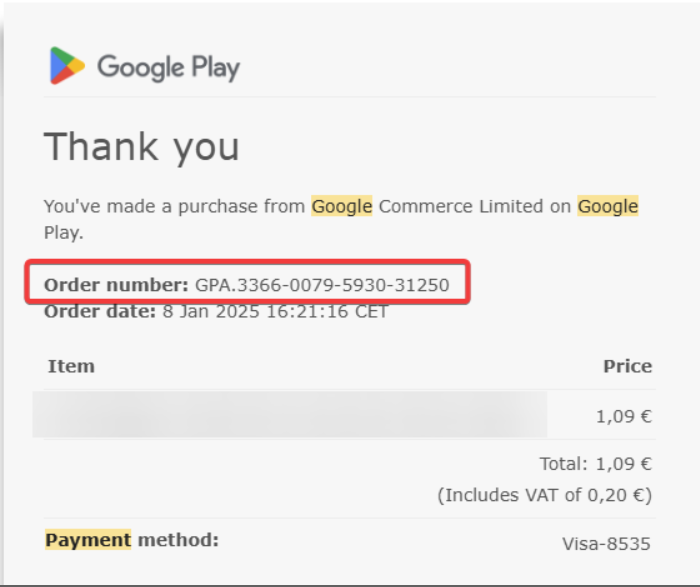
Google Play Store (Android)
Where to find it: Google sends a confirmation email to your Gmail address right after the purchase. You can also view it at pay.google.com under the Activity tab.
What to look for:
Order ID format: Always begins with GPA. followed by four groups of numbers (e.g., GPA.1234-5678-9012-34567).