🏙️ Residential Area/City, Buildings & Population! 🏙️
Need help with various aspects of the residential area (your city)?
Here, you'll discover essential and intriguing information about Residential Buildings, Service Buildings, Population, and their interrelationships.
⋅═════════•°• •°•═════════⋅
Residential Area
The residential area can be accessed by hovering over it in the Rail Yard.
Once you hover over it, you will notice that you have brand new options that can be accessed, such as:
Residential building shop
Service building shop
Roads
Additionally, you can see your current number of City Plans & Population.

Population & Passengers
By developing your Residential area, players are able to increase their overall population. A higher population is essential for progression because it directly impacts your Passenger yield.
Milestones: As you grow your population, you will hit specific Milestones. Reaching these targets permanently increases the rate at which you generate Passengers.
Checking Your Progress: Tap the Population Bar at any time to view your current statistic and see how close you are to the next Population milestone

Residential & Service Buildings
Residential Buildings
Residential buildings are the source of your population.
A residential building can be placed in your Residential area directly after purchasing or by going to your building inventory.
Residential Buildings need to be connected to a road.

Visual shown in the inventory shows the building at its maximum potential
How to Upgrade Residential Buildings: Place Service Buildings nearby to boost the population yield.
Visual Changes: As the yield increases, the building’s appearance will evolve to reflect its growth, eventually matching the inventory image.
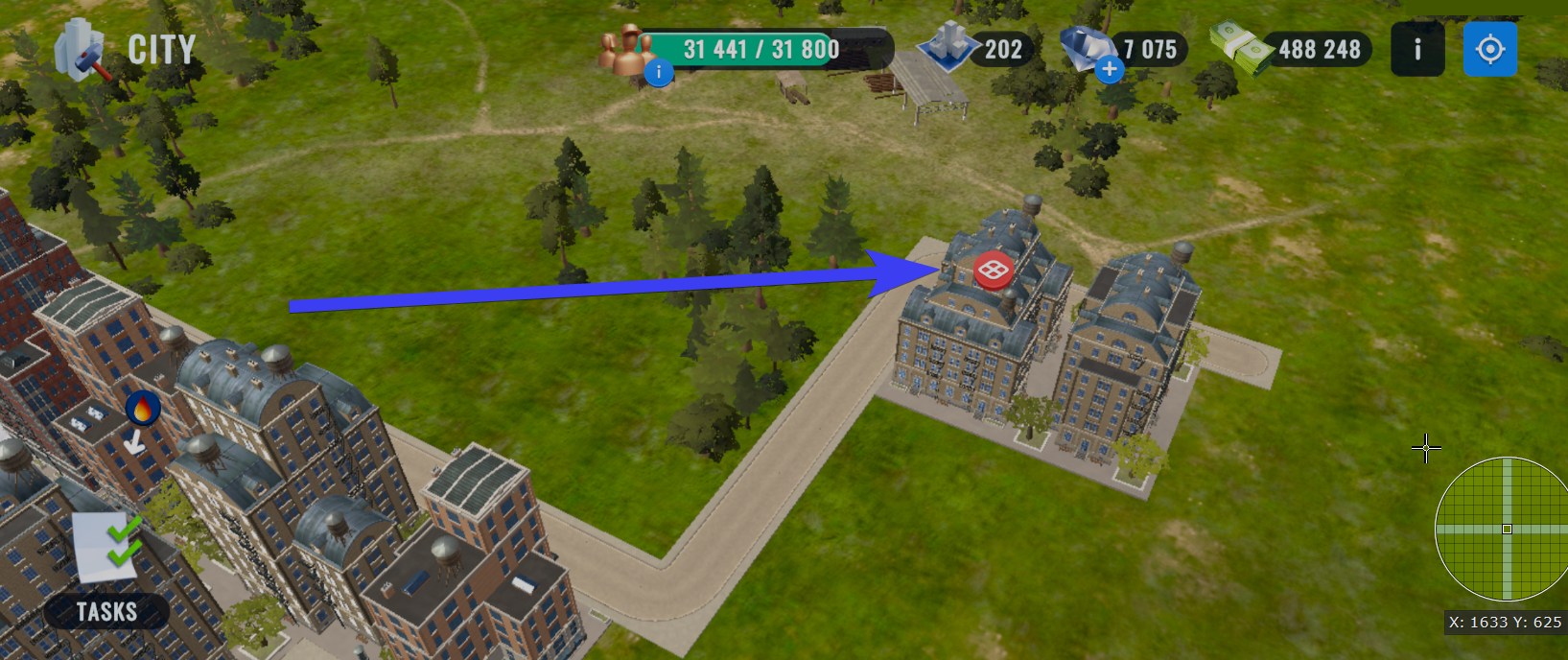
The red icon above the residential building indicates that it's not within the influence of any service building's aura. This means no service building is enhancing this residential building. To boost or upgrade the residential building, you'll need to place it closer to a service building so it's within its aura's reach.
⋅═════════•°• •°•═════════⋅
Service Buildings
Each service building provides a boost to nearby residential buildings. Service buildings only affect a limited area around them, shown by their aura. Residential buildings must be within this aura to receive the boost.
Placing them near your Residential buildings directly upgrades them, allowing them to produce more population.
Upgrade: Service buildings are upgraded by tapping on them and upgrading them with City Plans and Train Bucks.
Service buildings need to be connected with a road.

Moving & Stashing Buildings
To rearrange or remove a building:
Enter Move Mode: Tap and hold your finger on any building until it lifts off the ground.
Move: Drag the building to a new location.
Stash: To remove the building completely, tap the "Place In Inventory" button that appears.
City Plans
Currency used for upgrading your Residential Area and Service Buildings. Can be obtained via Event Shop, Era Pass, Event Pass, and in-game offers.

Expanding your Residential Area
To expand your residential area, find an empty plot of land with a red sign placed in it and tap on it.
Expansion will cost train bucks, and players must meet the year requirement or skip the requirements with Gems.

⋅═════════•°• •°•═════════⋅