📦 Full Warehouse & Deleting Materials! 📦
🪵Deleting Materials! 🪵
Unable to collect more materials? It might be due to the fact that your Warehouse is full!
Here you can find helpful steps on what to do once you reach maximum capacity in your Warehouse.
Checking your Warehouse storage
If you are unable to claim any more materials, it is important to check your Warehouse.

As we can see in the next image, the Warehouse Capacity is full.

Deleting Materials
Tap on the material that you wish to get rid of, in this case Bauxite Ore. Hit the red button with the rubbish bin icon
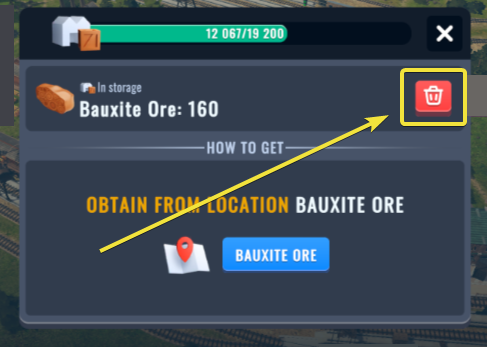
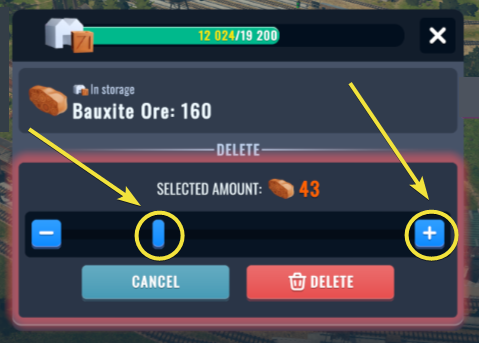
In the next step, choose the number of units to be removed either by moving the bar or using the Plus button ✚ on the right.
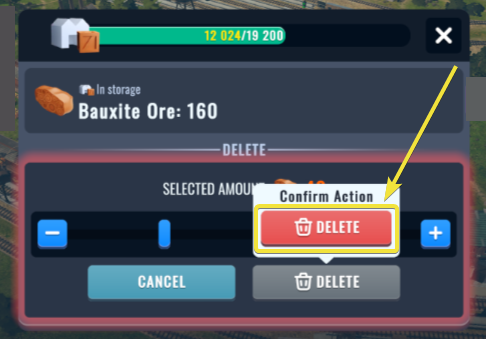
As the very last step, confirm your choice by hitting the red DELETE button.
Completing all of the steps above should allow you to manage your Warehouse Capacity, so you can retrieve the materials that you need instead!